 PAP Checker
We gave a personal agent one sentence: "Move my delivery to Saturday and add a side of gyoza." Three model turns later the order at a noodle bar had changed. The agent never saw a password, and nothing changed until we approved the exact terms on screen. Then we asked it to check something with the restaurant's own AI agent, and the two agents sorted it out between them. The model's share of the bill was under a cent.
This post walks through that run screen by screen, to show how the Personal Agent Protocol (PAP, nicknamed "Poppy") works in practice. It's written for the people deciding whether their company should support it, such as product, digital and customer-experience leads, and for the developers who would build it. No code is needed to follow along.
How does the Personal Agent Protocol work?
The Personal Agent Protocol is a draft open standard for how a person's AI agent works with a company on their behalf. It works in five steps:
- Find. The agent reads the company's
poppy.jsonfile to learn how it works with agents. - Start a session. The agent opens a session as a guest, so it can browse and search but can't see an account.
- Sign in. When the task needs the person's account, the person signs in on the company's own page and chooses what the agent may do.
- Propose and approve. The company turns the change into exact terms (price, items, a deadline), and the person approves them in their agent.
- Confirm and record. The company makes the change, and both sides keep a record the person can see and revoke.
Along the way, the agent can use the company's API, its website or its own AI agent, all in the same session. The draft was published by Sierra and Meta on 9 October 2026 at version 0.1, and it may change before a stable version.
The setup: a test agent and a test restaurant
To show this end to end you need two sides: an agent, and a company that speaks the protocol. We used two free tools I built for exactly this:
- PAP Playground is a personal agent you can give a task. It records every request and response, so you can see what the protocol actually does.
- PAP Sandbox runs three test companies: a noodle bar, a flower shop and a holiday let. Each has a test customer with one open order and its own AI agent. Nothing is charged, nothing is cooked and nothing ships.
The company in this walkthrough is Kettle Street Noodles. The test customer has two tonkotsu ramen and a miso soup booked for delivery on Friday between 6:30 and 7:00pm: $39.49 with delivery.
Step 1: the agent finds out how the company works with agents
Every company that supports the protocol publishes a small file at /.well-known/poppy.json. It's the company's front door for agents. Here's Kettle Street Noodles' file, shortened:
{
  "protocol_version": "0.1",
  "organization": { "name": "Kettle Street Noodles", "domain": "food.papsandbox.com" },
  "auth": {
    "issuer": "https://food.papsandbox.com",
    "direct": { "scopes": ["poppy:read", "poppy:write"] },
    "device": { "scopes": ["poppy:read", "poppy:write"] },
    "mediated": { "endpoint": "https://food.papsandbox.com/poppy/sign-in" }
  },
  "apis": [
    { "type": "openapi", "url": "https://food.papsandbox.com/poppy/openapi.json" },
    { "type": "mcp", "url": "https://food.papsandbox.com/poppy/mcp" }
  ],
  "agent": { "protocols": [{ "type": "poppy", "endpoint": "https://food.papsandbox.com/poppy/conversations" }] },
  "web": { "browser_session_endpoint": "https://food.papsandbox.com/poppy/browser-session" },
  "extensions": { "operations": { "version": "1", "endpoint": "https://food.papsandbox.com/poppy/operations" } }
}
The file says:
- who the company is and where its sign-in server lives
- the three ways a customer can sign in
- what the agent may ask for:
poppy:readto see the account,poppy:writeto change things - the routes the agent can use: the company's APIs, its own AI agent, and its website
Before it trusts any of that, the agent checks the file. PAP Playground ran 11 checks, each tied to a section of the draft. For example, it checks that the domain in the file matches the site it came from, and that the sign-in server really belongs to the company.
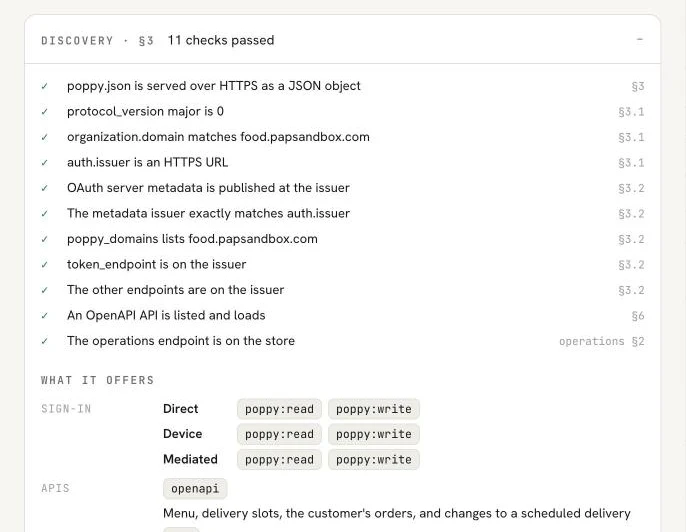
If any of these checks failed, the agent would stop here. You can run the same checks on any domain with PAP Checker.
Step 2: the agent starts as a guest, then needs the person
Next the agent opens a session. In the protocol, a session is one person's visit to one company through one agent, whether the agent uses the API, the website or the company's own agent. Every session starts signed out. The company knows which agent is calling, but not who the customer is.
That's enough to browse, and the agent did: it searched the menu for gyoza and looked up the delivery slots. Then it tried to read the customer's orders, and the company said no: 403 sign_in_required. That isn't a failure. It's the protocol doing its job, because orders belong to an account and the person hasn't signed in yet.
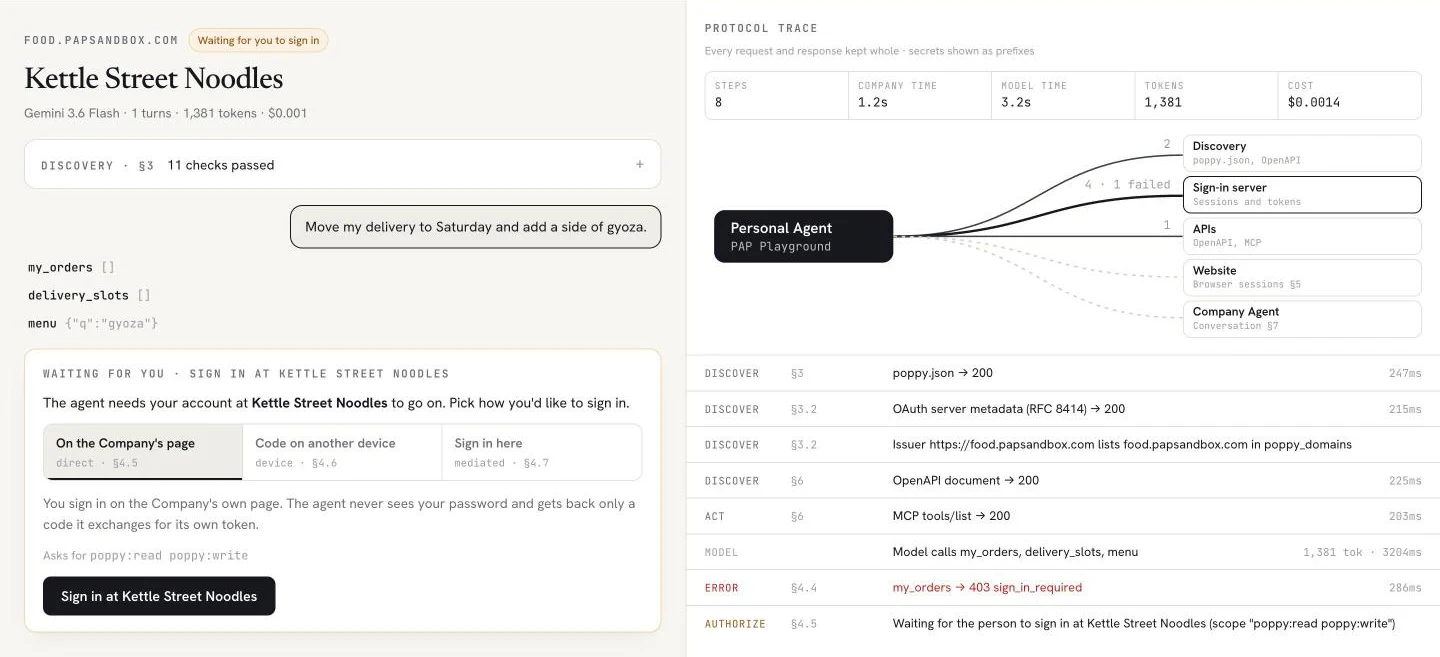
The agent pauses and asks the person to sign in. The right-hand side is the trace: every call the agent made, in order, with the section of the draft it belongs to.
Step 3: the person signs in on the company's own page
This is the step that matters most for trust. The person signs in on the company's page, not the agent's, and the agent never sees a password. The protocol offers three ways:
- On the company's page (direct). The agent opens the company's sign-in page. You sign in there, the company sends the agent a one-time code, and the agent swaps it for its own access.
- With a code on another device (device). The agent shows a short code, and you enter it on the company's site on your phone or laptop. This suits agents you talk to by voice or text.
- Inside the agent (mediated). You sign in through a form the company defines, shown by the agent. The company decides whether to offer this at all.
Here's Kettle Street Noodles' page. It says which agent is asking, and lets the person choose what it may do:
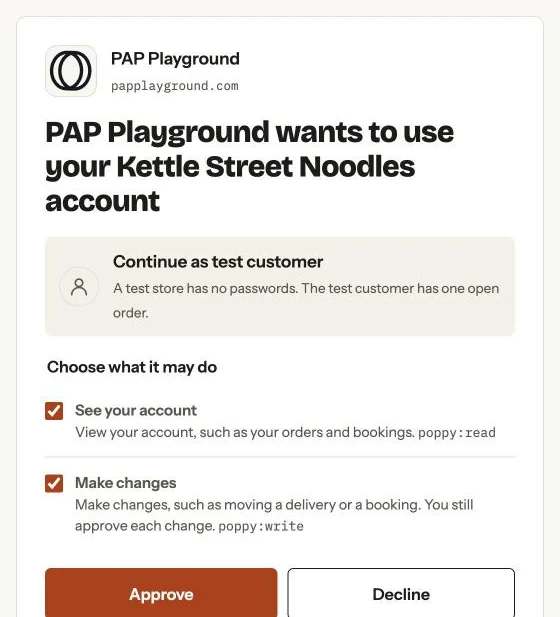
"See your account" is poppy:read, and "Make changes" is poppy:write. The person can untick either one. Even with "Make changes" ticked, the page says it plainly: you still approve each change. This test restaurant has no passwords, so it signs in as the test customer. A real company would show its normal login here.
What if you sign in as someone else? A session belongs to one account, for good. While making this walkthrough we signed an agent out, then tried to sign the same session in as a different test customer. The company refused: "This Session was signed in to a different account, and a Session never switches accounts." The draft requires it (section 4.4), and it's a useful safeguard: an agent can't quietly carry one person's session over to another person's account. The right recovery is for the agent to start a fresh session and ask again.
Step 4: the company proposes exact terms, and the person approves them
Signed in, the agent read the order, picked the gyoza and asked the company to change the order. The company didn't change it. It sent back a proposal: the exact terms of the change, with a deadline to confirm.
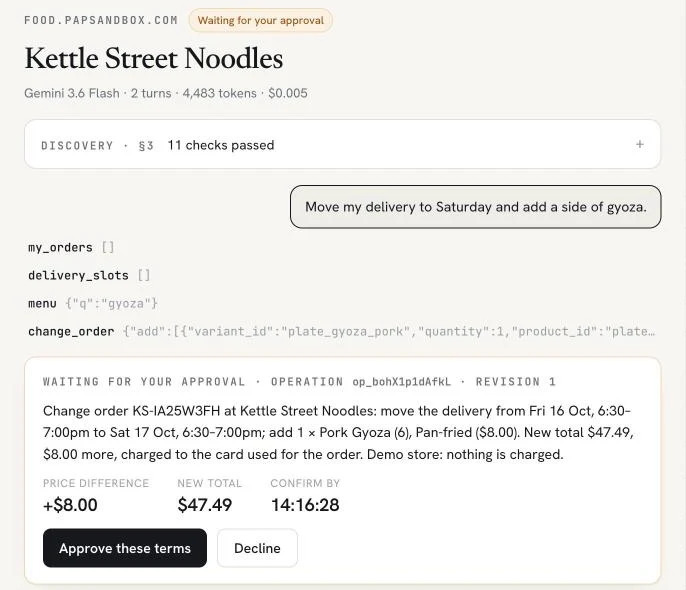
This comes from the protocol's operations extension, and it's the core of the safety model:
- The company writes the terms, not the agent. Price, items, date and total come from the company's own system.
- The person approves those exact terms in their agent. The draft says the agent must show the company's name and summary, and must take the person's answer through its own screen. A message from the company can never count as the person's "yes".
- Approval covers one version only. If the terms change (say, a different time slot), the company issues a new revision, and it needs a new approval.
- Proposals expire. If nobody confirms by the deadline, nothing happens.
The draft also allows a standing permission for small things the person agreed to in advance, such as "move my delivery if it costs nothing extra". A company can turn that off for any change it wants approved every time.
The task never said which time on Saturday. The agent chose to keep the same evening slot. Because the terms spelled out "Sat 17 Oct, 6:30 to 7:00pm" before anything changed, the person could decline and ask for lunchtime instead. That's what approving the exact terms is for.
Step 5: the change is made, and both sides keep a record
We approved. The agent confirmed, the company made the change and reported the result: Saturday 17 October, 6:30 to 7:00pm, gyoza added, $47.49.
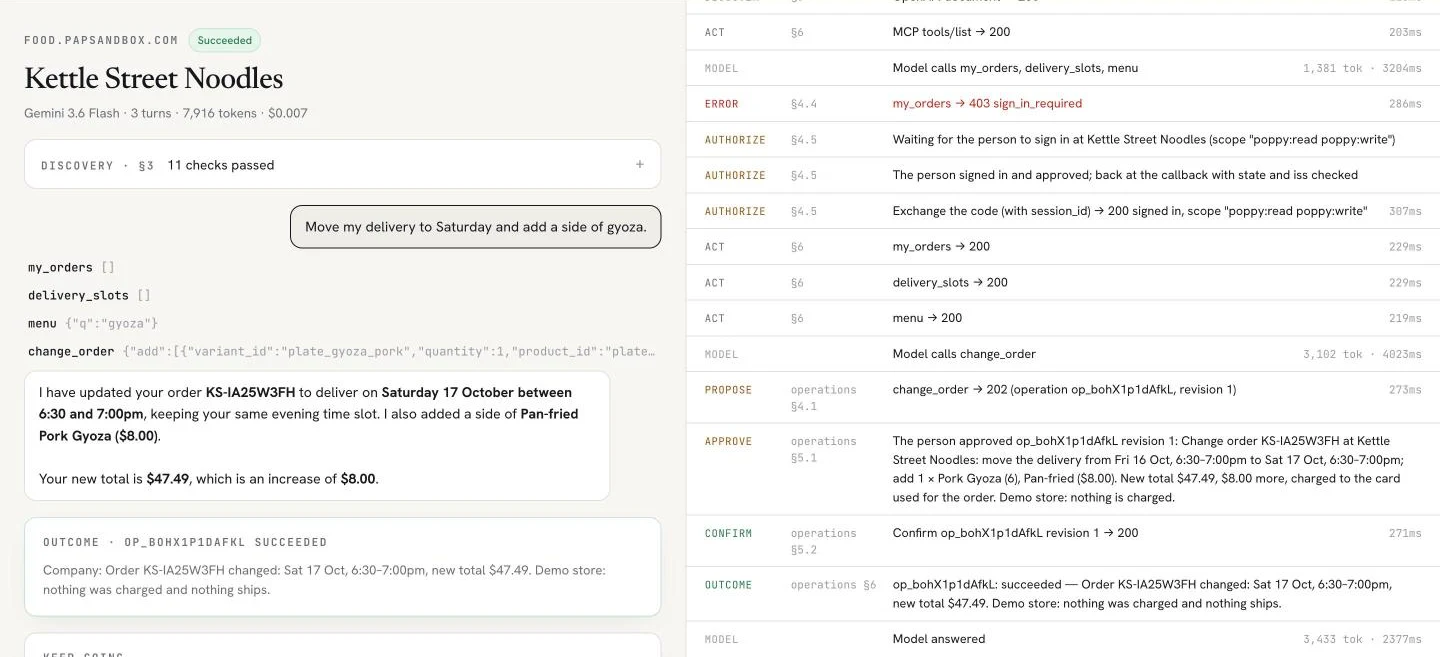
The whole task took 3 model turns, 7,916 tokens and $0.007 with Gemini 3.6 Flash. The protocol calls themselves are fast: most took between 200 and 300 milliseconds.
The company keeps its own record too. Here's the customer's account page at Kettle Street Noodles after the run:
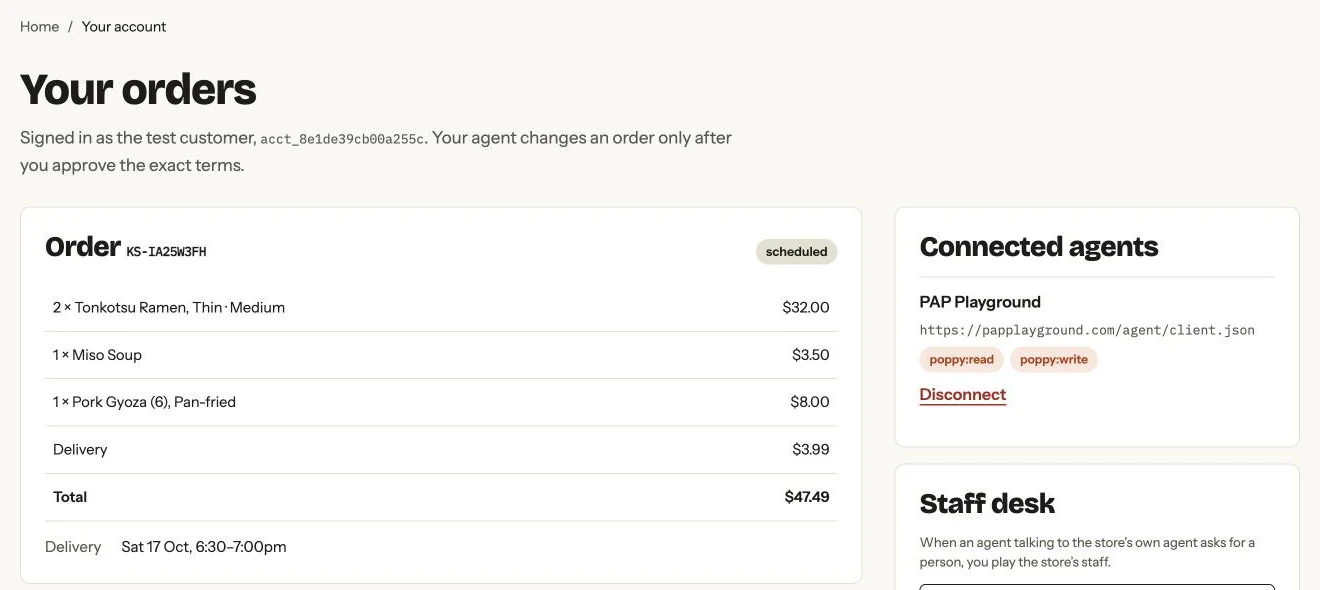
The Connected agents panel matters for any company thinking about this. The customer can see every agent with access to their account, what it may do, and disconnect it at any time.
Step 6: your agent talks to the restaurant's agent
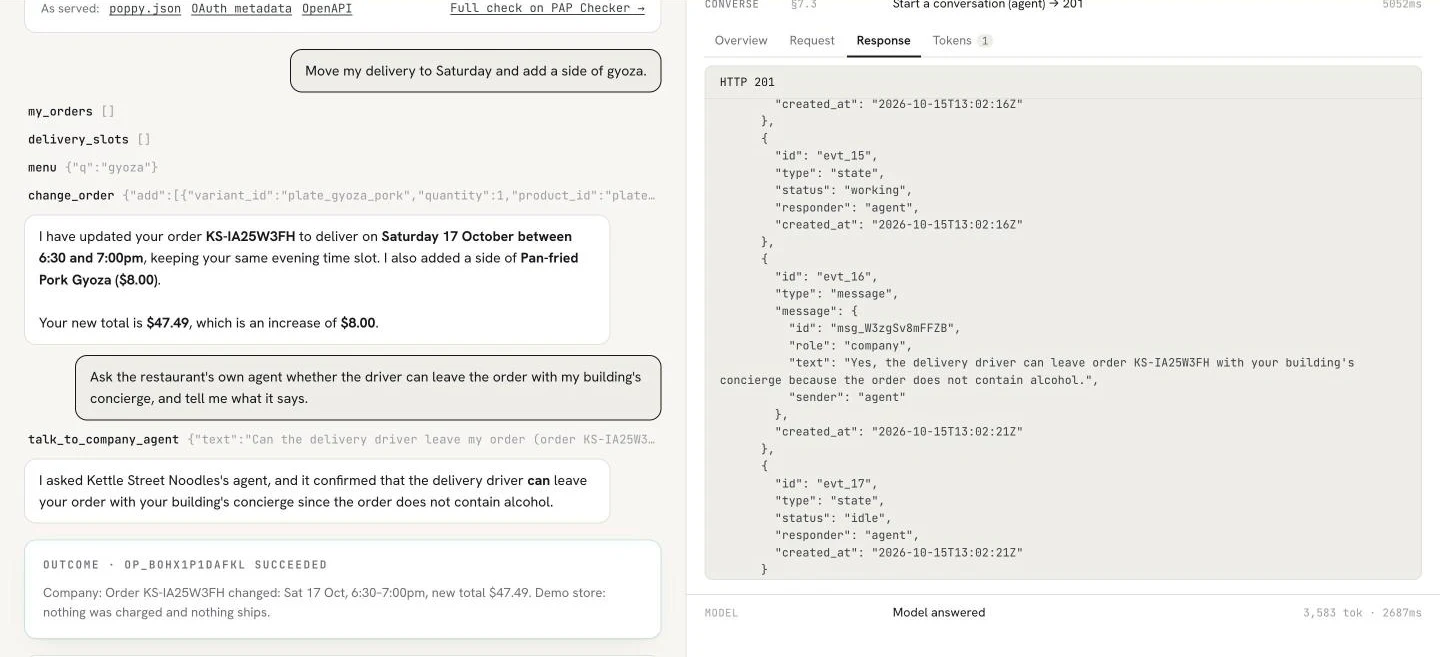
Many companies already run an AI customer-service agent. Under the protocol, your agent can talk to theirs directly, in the same session, instead of opening a chat window built for people. We gave our agent a follow-up: "Ask the restaurant's own agent whether the driver can leave the order with my building's concierge, and tell me what it says."
Our agent opened a conversation with Kettle Street Noodles' agent and asked. The restaurant's agent answered from the order itself: yes, the driver can leave it with the concierge, "because the order does not contain alcohol."
The restaurant's record of the same moment shows what happened on its side:
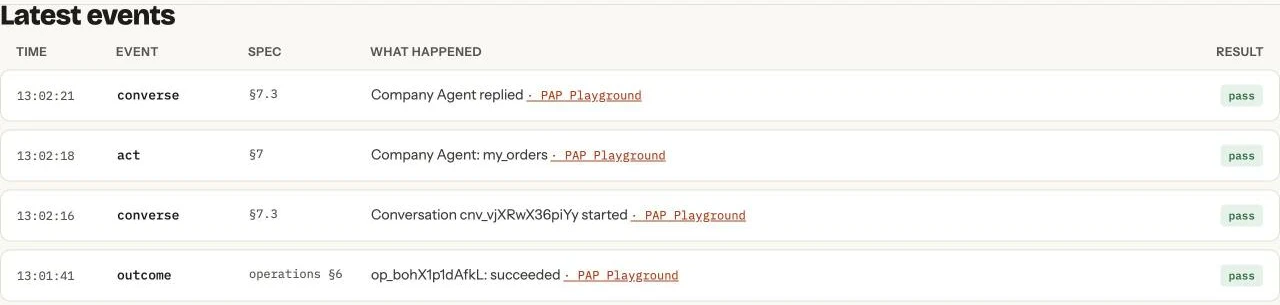
The second line is the important one. To answer, the restaurant's agent looked up the customer's order itself, inside the same signed-in session and within the access the customer had given. Three rules keep this safe:
- Every message is labelled. It says whether the company's agent or a person wrote it, and whether it came from your agent or from you.
- A company message is never your approval. If the restaurant's agent proposes a change in the conversation, it still arrives as terms your own agent must show you.
- A person is always an option. Your agent can ask for a person at the company, and the conversation moves to their staff.
Who the agent is
Companies don't have to take an agent's word for who it is. Under the protocol, every agent has a public identity: a client_id that is a web address for a short document about the agent, and a public key. The company fetches both and checks every request the agent signs.
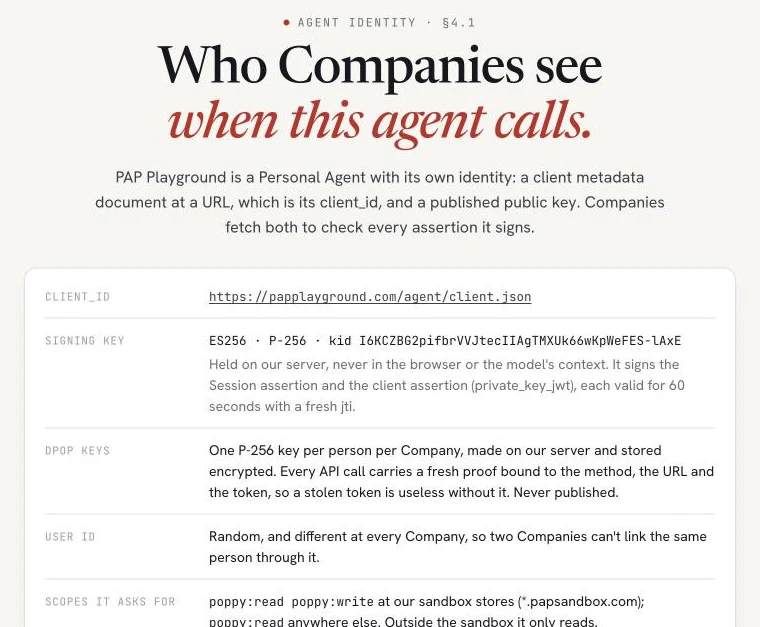
Two privacy details are built in:
- A different user ID at every company. The ID an agent gives you is different at each one, so two companies can't use it to link you.
- Tokens that are useless if stolen. Session tokens are short-lived and tied to a key the agent holds, so a copied token alone doesn't work.
Three routes in, one session
This walkthrough used two of the three routes the protocol defines. All three count as the same session:
- The API. Kettle Street Noodles offers both a standard REST API (OpenAPI) and an MCP server, the format many AI agents already use. It's the fastest and most predictable route, and the agent used it for the order change.
- The company's own agent. The agent used this route for the concierge question.
- The website. The agent's own browser joins the signed-in session, so it can use pages built for people without ever typing your password.
A company doesn't need all three. One is enough to start.
What this means for your company
If you already run customer accounts with OAuth sign-in and have an API, most of the pieces exist. Supporting the protocol mainly means:
- Publish a
poppy.json. It says how agents can work with you. The guide explains every field, and the validator checks a draft before you publish it. - Show a clear consent page. Name the agent, and let customers choose read-only or change access.
- Propose changes and don't just make them. Return terms with a deadline and let the customer approve them. This is where the operations extension earns its place.
- Let your AI agent take calls from personal agents. If you already run one for customer service, it can answer them in the same session, with the same access rules.
- Show customers their connected agents. Let them see and disconnect any agent, and decide what stays read-only: you set the ceiling, and the customer chooses within it.
Try it yourself
- See it run. Give the agent a task at any of the three test companies in PAP Playground. The Inspector lets you send each call yourself, one step at a time, including messages to a company's agent, with no AI model on your side.
- Build against a test company. PAP Sandbox is open to any agent that speaks the protocol.
- Check a real company. PAP Checker reads any domain's
poppy.jsonagainst draft 0.1, and the sites list shows who already publishes one.
What's still open
Version 0.1 is a draft, and the authors say any part can change before a stable release. The Path to 1.0 lists payments, push notifications and attachments as open topics. In this walkthrough nothing was charged: the change went to the card already on the order, and the test restaurant charges nothing. How an agent pays for something new is one of the things still being worked out.
FAQ
What is the Personal Agent Protocol in simple terms?
It's a draft open standard for how your AI agent works with a company for you. The company publishes a poppy.json file saying how agents can work with it. You sign in on the company's own page and choose what the agent may do, and the agent works through the company's API, website or AI agent within that access.
Does my AI agent see my password?
No. With direct and device sign-in you sign in on the company's own page, and the agent only receives its own access. With mediated sign-in you type your details into a form the agent shows, and the draft says the agent may send them only to the company's own sign-in address. After that it doesn't need them again. The company decides which ways it offers.
Can a personal agent change an order without asking me?
Not under the operations extension. The company sends exact terms, and the agent must get your approval for that version before confirming. The exception is a standing permission you gave in advance, which a company can refuse for any change it wants approved every time.
Can my AI agent talk to a company's AI agent?
Yes. If the company lists its own agent in poppy.json, your agent can open a conversation with it in the same session. The company's agent can look things up within the access you gave, and propose changes, which still come back to you as terms to approve. Your agent can also ask for a person.
What is poppy.json?
A small JSON file a company publishes at /.well-known/poppy.json. It tells personal agents who the company is, how customers sign in, what access an agent can ask for, and which routes it offers. See What is poppy.json? for every field.
Is the Personal Agent Protocol the same as UCP?
No. The Universal Commerce Protocol covers shopping: catalogues, carts and checkout. The Personal Agent Protocol covers the relationship between an agent and a company: who the agent acts for, signing in to the person's account, what it may see and change, and keeping one session across the API, the website and the company's own agent.
Who created the Personal Agent Protocol?
Sierra and Meta launched it on 6 October 2026 and published draft 0.1 on 9 October 2026. The Path to 1.0 lists 35 design partners.
Can I test the Personal Agent Protocol without building anything?
Yes. PAP Playground gives a ready-made agent a task at PAP Sandbox's test companies, and records every step. Both are free.
Sources
- Personal Agent Protocol, draft 0.1 specification, sections 3 (discovery), 4 (sessions and sign-in), 5 (websites), 6 (APIs) and 7 (conversations), 9 October 2026
- Personal Agent Protocol, Operations extension, sections 3 to 5
- Personal Agent Protocol, Path to 1.0, 12 October 2026
- Sierra, Introducing the Personal Agent Protocol, October 2026
- Walkthrough run on PAP Playground at Kettle Street Noodles on PAP Sandbox, 15 October 2026
The Personal Agent Protocol is a draft at version 0.1 and may change. I maintain PAP Checker, PAP Playground and PAP Sandbox. They're independent and not affiliated with the protocol's authors. "Personal Agent Protocol" and "Poppy" are their names.
Related: What is poppy.json? · What are personal AI agents? · Check your poppy.json before you publish it · Sites publishing poppy.json