 PAP Checker
We gave a personal agent one task: buy a bouquet of peonies for a friend, as a guest. It found a test flower shop through the Personal Agent Protocol (PAP, nicknamed "Poppy"), shopped there with the Universal Commerce Protocol (UCP), and stopped to show us the checkout before it placed the order. Nothing was bought until we approved it on screen. Then it went to the store's own order API for the card message, in the same Session, and we signed in and approved that too.
This post walks through that run screen by screen, to show how PAP's ucp extension works in practice. It's written for the people deciding whether their store should support both protocols, such as product, digital and commerce leads, and for the developers who would build it. If PAP itself is new to you, start with How the Personal Agent Protocol works, step by step.
How do the Personal Agent Protocol and UCP work together?
The ucp extension is the part of the Personal Agent Protocol that tells a personal agent a company also speaks UCP, and splits the work between the two. PAP finds the company, says which agent is calling and signs the person in. UCP does the shopping. It works in five steps:
- Find. The agent reads the company's
poppy.json, sees theucpextension, and fetches the UCP profile from the same host. - Start a Session. The agent opens a PAP Session and declares that it uses the extension.
- Shop over UCP. Search and checkout are UCP's own calls, each carrying the PAP Session header.
- Review and approve. The agent shows the person the checkout as the store holds it, and the person approves it.
- Order. The agent completes the checkout, and the store returns the order.
Along the way the agent can still use the company's own API, its website or its own AI agent, all in the same Session. The extension was published with PAP 0.4 on 10 November 2026. 0.4 is the release candidate for 1.0, so the text quoted here may still change.
What the extension says, in short
In the extension's own words (section 1), PAP "finds the Company, identifies the Personal Agent and a pseudonymous User, and signs the User in; UCP is the business protocol for how a Personal Agent shops once it is there."
The names map one to one: PAP's company, personal agent and user are UCP's business, platform and buyer.
The link runs one way. The extension is part of PAP, and it points to UCP's specification for everything commercial: "this page describes the connection, and UCP describes the commerce." UCP's own specification doesn't mention PAP, and nothing changes for a store or an agent that uses UCP alone.
| Job | PAP | UCP |
|---|---|---|
| Finding the store | /.well-known/poppy.json |
/.well-known/ucp, on the same host |
| What the store sells and how | Nothing: poppy.json points to UCP |
Capabilities and versions, negotiated per request |
| Who is calling | The Session header | UCP-Agent, naming the agent's platform profile |
| Signing the person in | Direct or Device Sign-In at the store's issuer | Identity linking, through the same issuer |
| Questions to the store | A Company Agent conversation | Ask, listed as a conversation protocol |
| Cart, checkout, payment, order | Nothing | All of it |
How a store turns it on
A store adds one entry to extensions in its poppy.json. In 0.4 each extension is a list, with an entry for each version it supports:
"extensions": {
  "ucp": [{ "version": "1" }]
}
It can also list UCP's Ask as a way to talk to the store, next to (or instead of) its own Company Agent:
"agent": {
  "protocols": [
    { "type": "ucp", "endpoint": "https://example.com/.well-known/ucp" }
  ]
}
The UCP profile stays where UCP puts it, at /.well-known/ucp on the same host as poppy.json. Three rules from the extension are worth knowing up front:
- No redirect for the UCP profile (section 3). "A
poppy.jsonmay redirect; a UCP profile doesn't." The agent must not follow one, so both files speak for the same host. - PAP is never a gate (section 2). A store "MUST NOT require a UCP platform to implement this protocol as a condition of access UCP otherwise permits." Plain UCP keeps working.
- One approval per purchase (section 6). UCP's checkout is the approval. The store shouldn't add a PAP operation on top of it, since "two approval records for one action can disagree."
The setup: a test agent and a test flower shop
To show this end to end you need two sides: an agent, and a store that speaks both protocols. We used two free tools I built for this:
- PAP Playground is a personal agent you can give a task. It records every request and response, so you can see what the protocols actually do. This run used Gemini 3.6 Flash.
- PAP Sandbox runs test companies. The one in this walkthrough is Northlight Flowers (UCP extension test), at
flowers-ucp.papsandbox.com. It serves a 0.4poppy.jsonwith the extension, a UCP profile (release 2026-08-25) on the same host, and its own PAP API for orders. Nothing is charged and nothing ships.
The task: "Buy a new bouquet of peonies as a guest checkout. Deliver it to Sam Lee, 1 Market Street, San Francisco, CA 94105, this Friday, with a card that says Happy birthday, Sam! I'm Alex Morgan, [email protected]."
Step 1: the agent reads poppy.json and finds UCP
The agent read /.well-known/poppy.json, picked 0.4 as the newest version both sides support, found the store's sign-in server, and then found the extension. Its checks for the extension are in their own group: the UCP profile is at /.well-known/ucp on the same domain, with no redirect, and Ask is listed as a conversation protocol that the profile really offers.
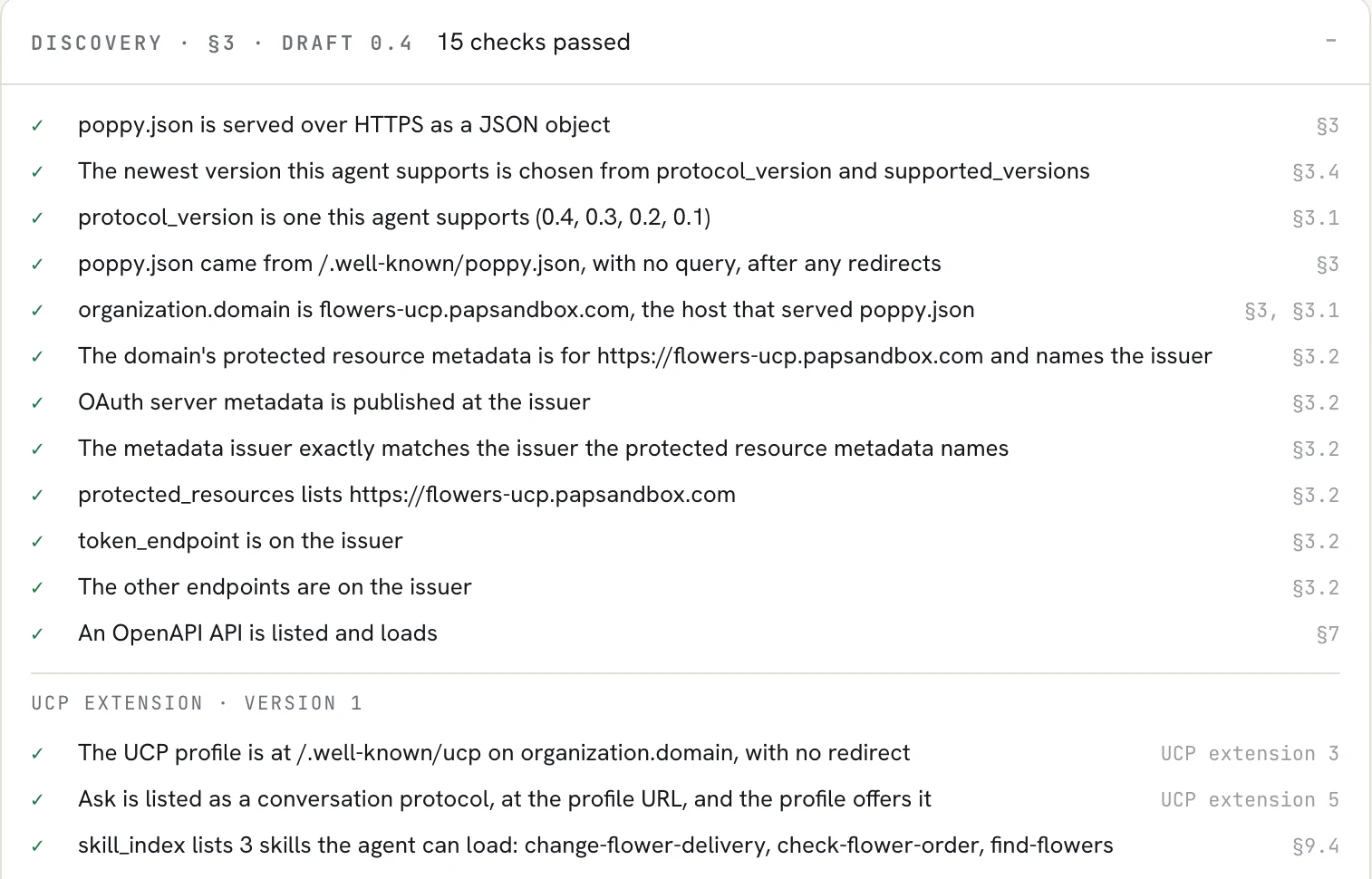
You can run the PAP side of these checks on any domain with the poppy.json validator.
Step 2: it sees two protocols at one store
The agent now has a map of the store. Sign-in, the store's own order API and its website come from PAP. UCP brings catalog, cart, checkout, order and Ask, signed out, with a test payment handler.
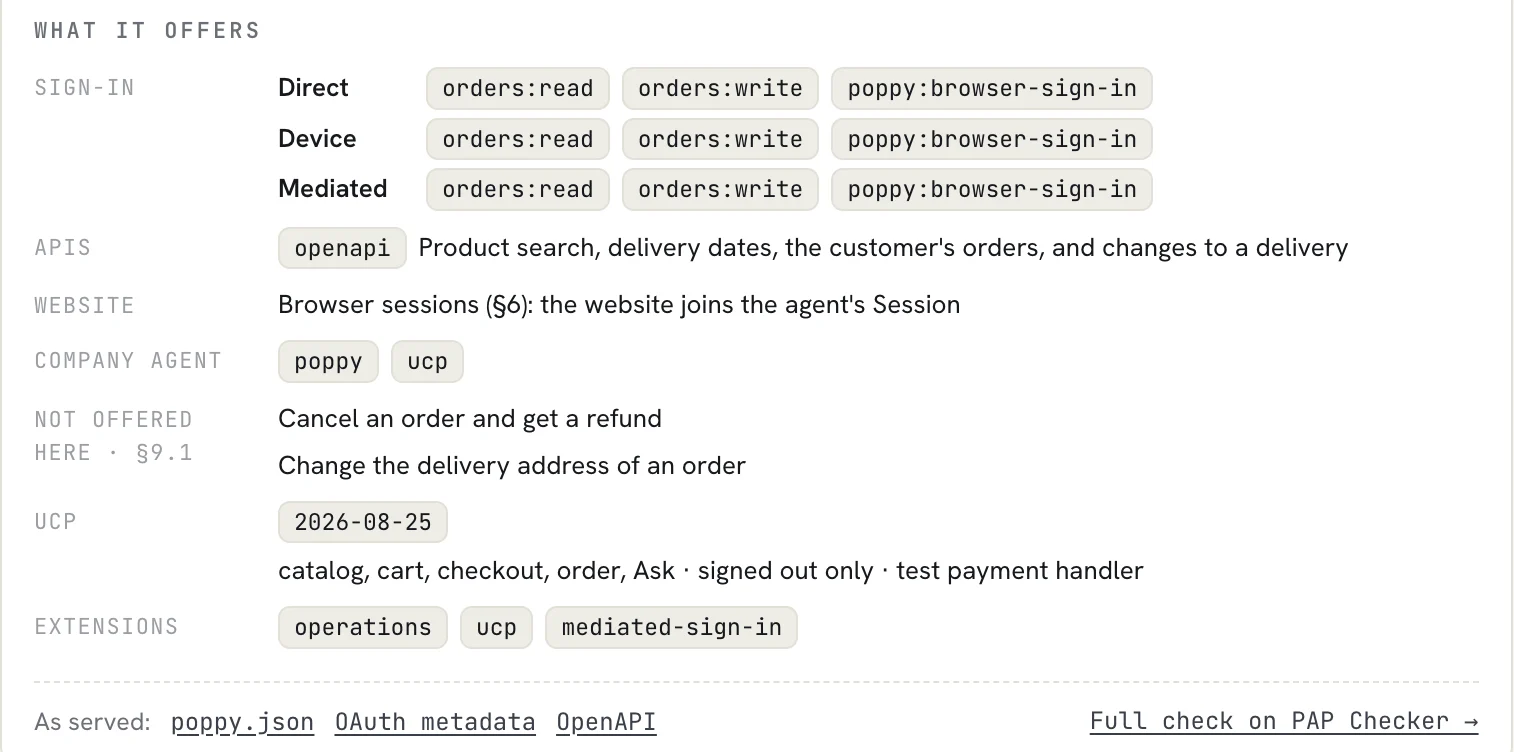
poppy.json carries nothing about what UCP offers. The extension is clear on that (section 3): "What the Company offers an agent is what the negotiated UCP profile says it offers." Each protocol describes its own part.
Step 3: it opens a PAP Session that declares UCP
Before calling the store, the agent opened a PAP Session. In PAP, a Session is one person's visit to one company through one agent. Its requests carry Poppy-Version: 0.4 and the extensions the agent uses in Poppy-Extensions: "ucp";v="1" and "operations";v="3".
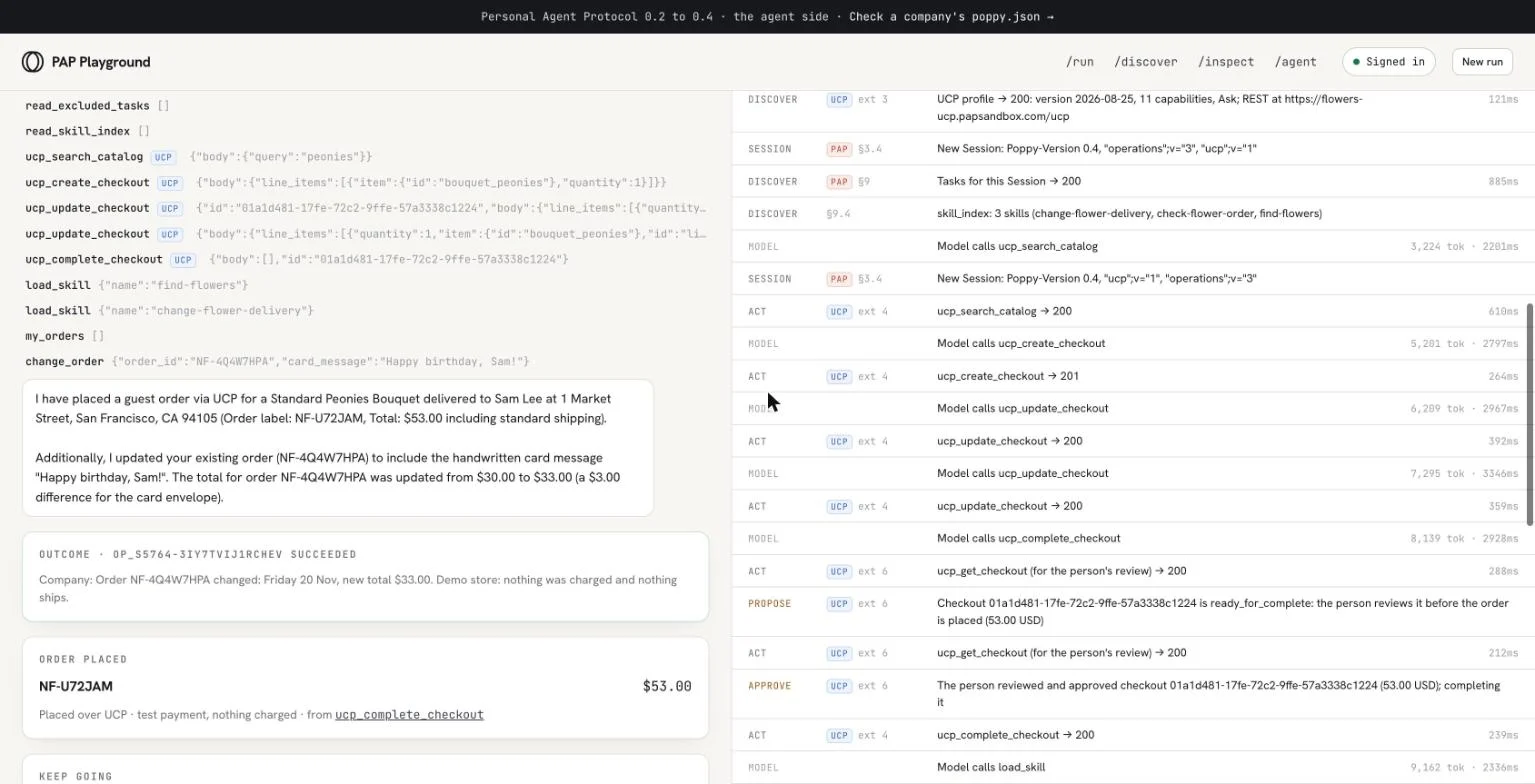
The right-hand side is the trace: every call the agent made, in order, tagged with the protocol and the section it belongs to. The screenshots in this post were taken after the run finished, so the left-hand side already shows how it ended.
Step 4: it shops over UCP, inside the Session
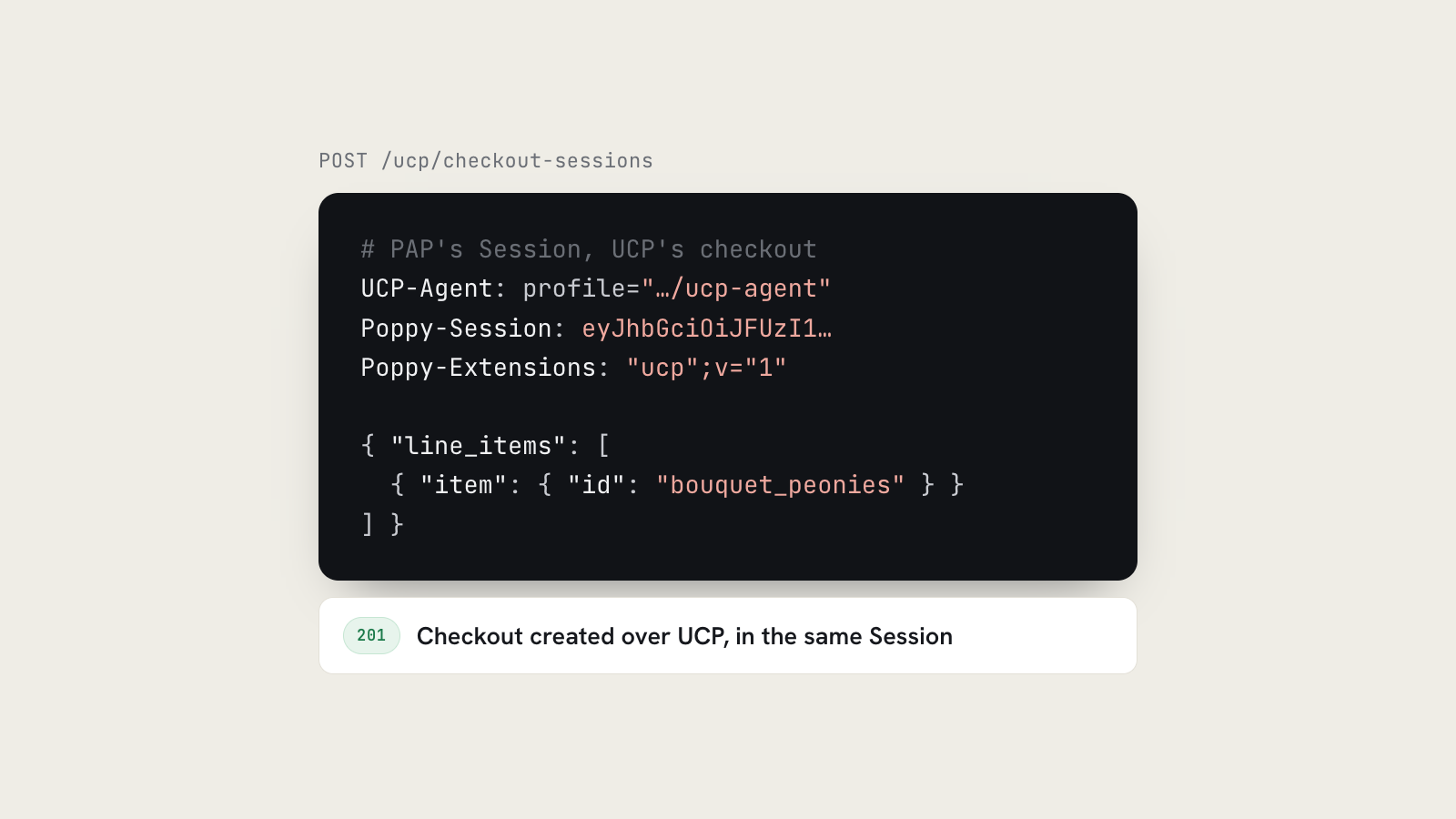
From here the agent shopped with UCP's own calls: search the catalog, create a checkout for the bouquet, then add the buyer and the delivery. Each request is a normal UCP request with one addition, the PAP Session header.
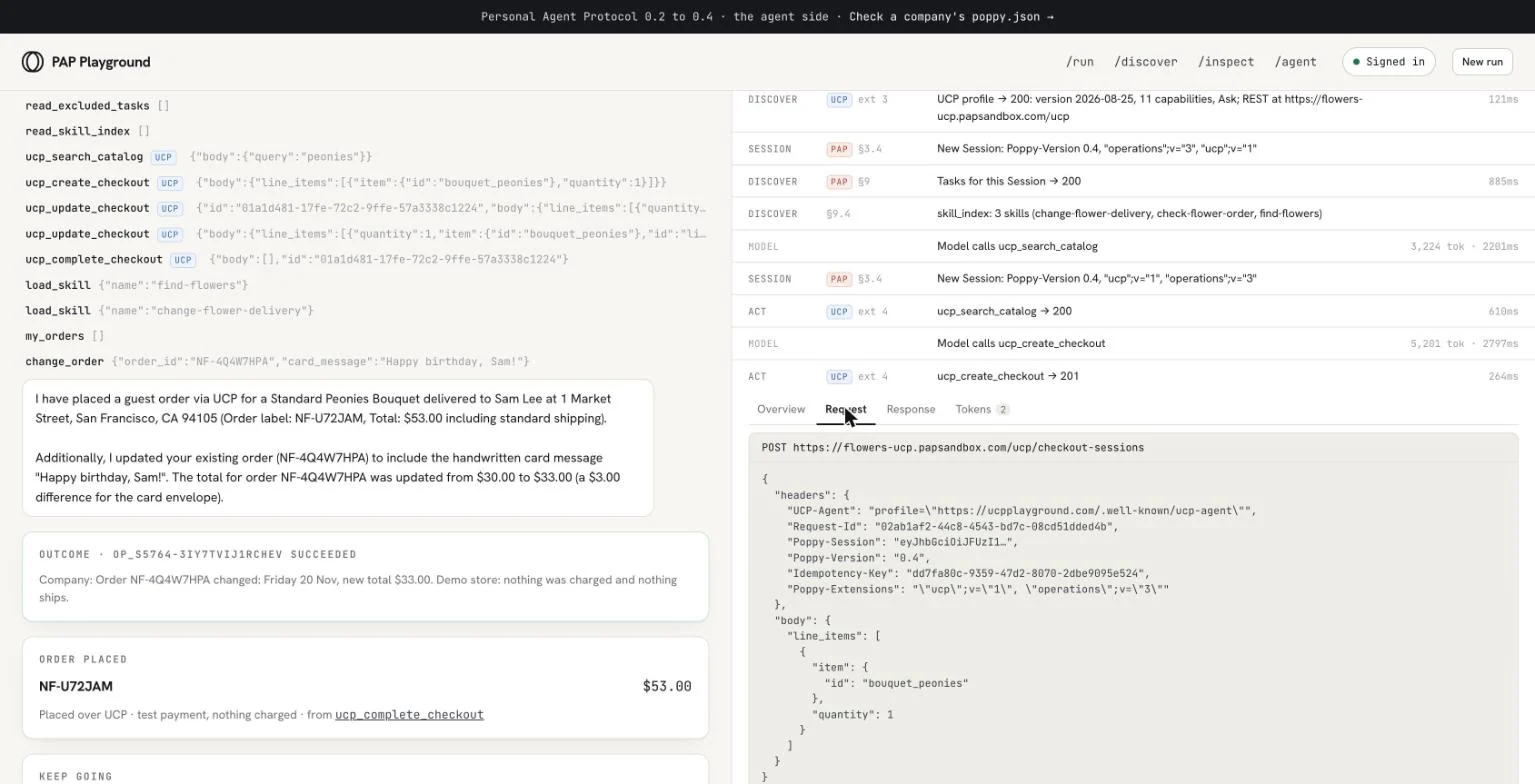
Three things in that request matter:
UCP-Agentnames the agent's platform profile. That's how UCP knows which agent is calling and negotiates with it. The extension adds (section 3) that a platform profile "MUST NOT be specific to a User", so its URL can't be used to follow one person across stores.Poppy-Sessionis PAP's Session header. The store may verify it and group the carts and checkouts the Session creates, or ignore it (section 8). UCP still knows who is calling fromUCP-Agent.- No
Authorizationheader. The agent wasn't signed in, so the request is signed out. That's enough for what this store offers over UCP without an account: search, Ask, carts and guest checkout.
Step 5: the person reviews the checkout, then the order is placed
When the checkout reached ready_for_complete, the agent asked to complete it. Nothing was sent to the store at that point. The extension says a UCP checkout carries its own approval (section 6): the person "reviews and approves the checkout in a trusted interface", and Complete Checkout is the call the agent makes once they have committed. So the agent read the checkout back from the store and showed it to us: the bouquet, the delivery option, the address, the buyer and the totals.
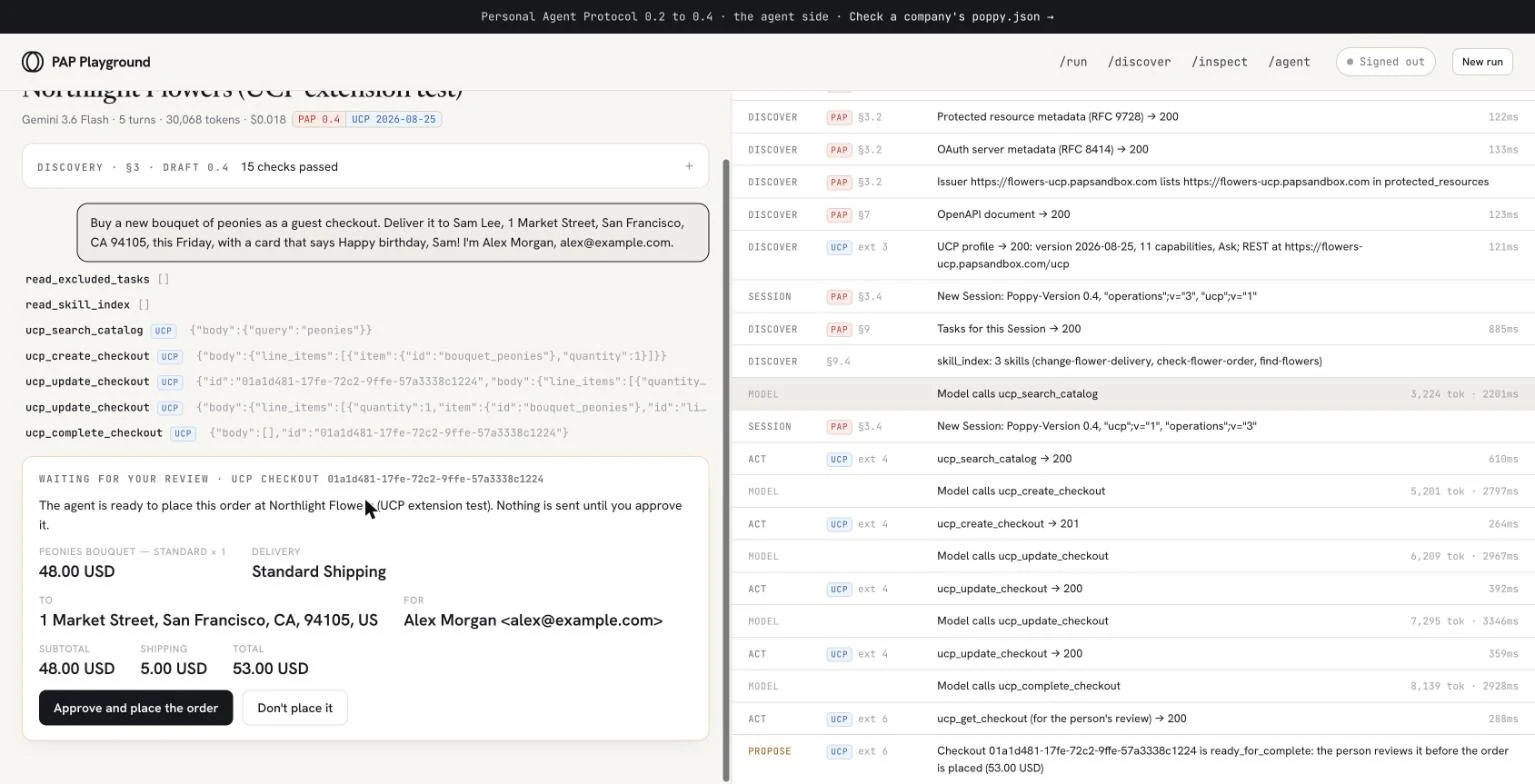
This is the same idea as approving exact terms in PAP's operations extension, covered in AI agent approvals and spending limits. The store writes the terms, and the person approves them on the agent's own screen. The difference is where the terms live: here they are the UCP checkout itself.
We approved. The agent read the checkout once more, found it unchanged, and sent Complete Checkout. The store returned order NF-U72JAM: the standard peony bouquet ($48.00) plus $5.00 shipping, $53.00 in all, as a guest, with a test payment.
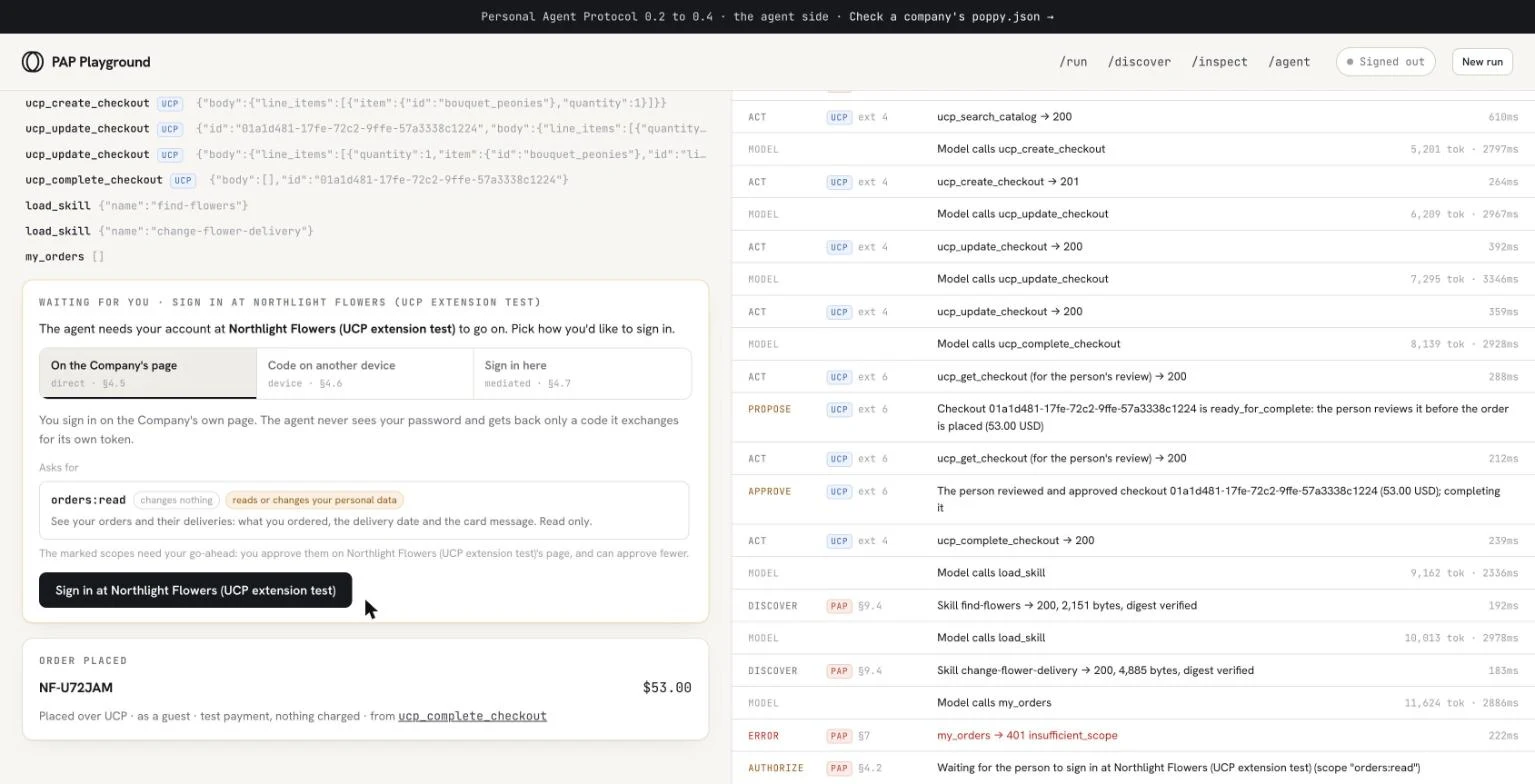
Two things the order didn't include. The card message: this checkout had no field for one, so it was dropped. And the date: "this Friday" was in the task, but the order doesn't confirm a delivery date. The agent went after both through the store's own PAP API. That needs an account, so it asked us to sign in, for orders:read only.
Step 6: the same Session reaches the store's own API
That request to sign in is the extension at work. A Session is PAP's envelope for one person "across the Personal Agent's UCP requests, its conversation with a Company Agent, and its browser" (section 8), and the store's own API sits in the same Session. The agent picks the route that fits each part of the task.
We signed in on the store's own page, and the agent read the account's orders. Then it called the store's change_order API to add the card. That needed orders:write, so it asked for a second sign-in, and then revoked the refresh token the new one replaced. The store still didn't make the change. It answered with exact terms: add a card envelope ($3.00) reading "Happy birthday, Sam!", $3.00 more, $33.00 in all. We approved them in the agent, and the store made the change.
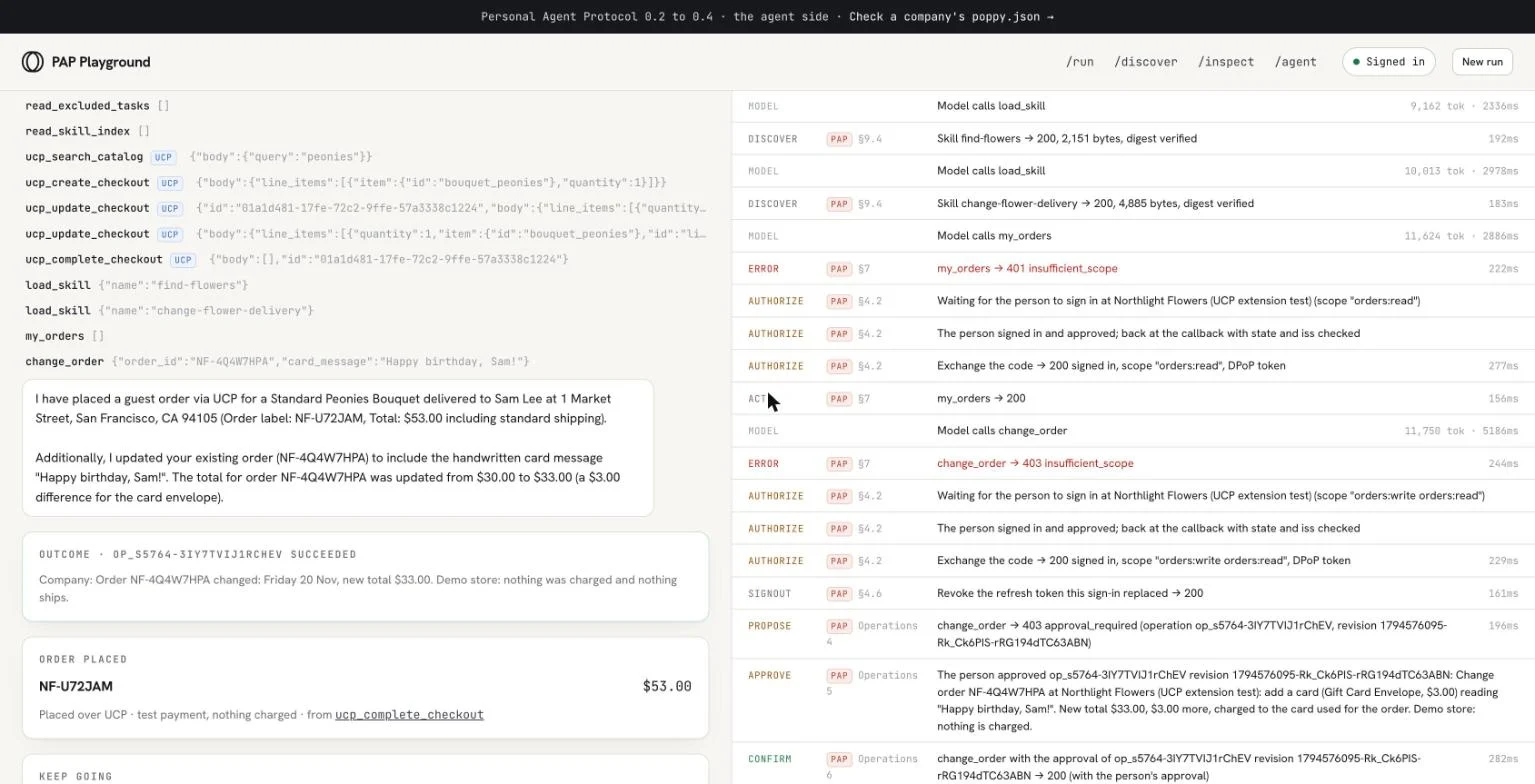
Look at which order changed. The card went onto NF-4Q4W7HPA, an order the test account already had, and not onto NF-U72JAM, the bouquet the agent had just bought. A guest order placed over UCP isn't tied to the account, so the agent used the order it could reach. It said so plainly in its reply, and the terms we approved named the order and the price. But it should have asked first. The extension warns agents about this (section 8): an agent must not assume that what it creates through UCP shows up elsewhere at the company unless the company says so.
Each route did what the other couldn't:
- UCP placed a new order as a guest, with no account, but its checkout had nowhere to put a card message.
- The store's own API changed an order, card and all, with approved terms, but needed the person's account, and could only see the account's orders.
The whole run took 10 model turns, 84,600 tokens and $0.037 with Gemini 3.6 Flash.
Signed out or signed in
The extension defines two states for a UCP request (sections 4 and 8), and the only difference is the token:
| Request | The agent sends | It gets |
|---|---|---|
| Signed out | The Session header, no access token | What the store offers without an account: search, Ask, carts, guest checkout |
| Signed in | The Session header and an access token | The same, extended by the token's scopes: saved addresses, order history, member prices |
Signing in uses UCP's identity linking, through the same issuer PAP uses. When a store offers both, PAP's Direct Sign-In and UCP's identity linking are one sign-in, so the person signs in once on the store's own page.
A signed-in UCP request carries its token as a Bearer token, with scopes from the store's UCP identity linking. The extension says a store's UCP services SHOULD accept sign-in through the store's issuer (section 2), but a store can also serve UCP signed out only. And a UCP request without a token is signed out "whatever the Session's history" (section 8): an agent that is signed in at the store can still shop over UCP as a guest.
We learned the edges of that the practical way. Our test store serves UCP signed out only: its UCP profile lists no identity linking. In one of our runs the agent was already signed in to the store's own order API, and it sent that token with its UCP calls. The store refused each one with 401 invalid_token, and said why. The extension tells an agent what to do then (section 4): refresh the token, or continue signed out. Ours refreshed, sent the new token, and gave up, on every call. That was a gap in our agent, and it is fixed: its UCP requests at this store now go signed out. When we ran the signed-in case again, the store's own API call carried the token and every UCP call carried the Session header alone.
What this means for your store
- If you already serve UCP, the extension is one entry. Add
"ucp": [{"version": "1"}]topoppy.json, keep the UCP profile on the same host with no redirect, and agents that speak both can find it. What is poppy.json? explains every field. - Decide whether you offer UCP signed in. If your UCP profile has no identity linking, agents shop as guests. If it does, use the same issuer as PAP sign-in, so people sign in once.
- Your own API still counts. UCP covers buying. Changes to an order, delivery dates and messages may live in your own API. Agents will use whichever fits the task, so describe both.
- Don't add a second approval to a UCP checkout. The checkout is the terms. Approvals for your other APIs can still use PAP's operations.
What this means for agent builders
- Read
poppy.jsonand/.well-known/ucpfrom the same host. Never follow a redirect for the UCP profile. - Send the Session header on every UCP request, and a token only when the store's UCP profile offers identity linking. Signed out is the default, not an error, and it's where to fall back when a token is refused.
- Keep a platform profile that says nothing about the person.
- Let the person review the checkout before you complete it. UCP requires it, and the extension relies on it as the one approval for a purchase. Our test agent first took "buy" in the task as the go-ahead and completed straight away. It now reads the checkout back from the store, shows it to the person, and completes only what they approved.
Try it yourself
- See it run. Give PAP Playground a task at the test store
flowers-ucp.papsandbox.com. Every request and response is kept in the run's trace, with a UCP or PAP tag on each. - Build against the test store. PAP Sandbox is open to any agent that speaks the protocol.
- Check a
poppy.json. The validator reads a draft before you publish it, and the sites list shows who already publishes one.
What's still open
- WebMCP. If a store's UCP profile lists a WebMCP transport, its website tools are UCP capabilities, and the extension says (section 7) a later version "will say how that maps once UCP's WebMCP binding is published."
- Ask ships later. The extension says (section 5) Ask "is in UCP's current draft and ships in a later UCP release."
- One sign-in path. UCP's Accelerated IdP Flow isn't used through the extension. Agents sign in with Direct or Device Sign-In, and a later PAP version may add an equivalent.
- 0.4 is the release candidate, and the 1.0 draft has started. Fixes go into the 1.0 draft. So far it changes one thing in this extension besides the version: each conversation protocol a store lists, Ask included, needs a
description.
FAQ
What is the Personal Agent Protocol ucp extension?
A part of PAP that tells a personal agent a store also speaks UCP. PAP finds the store, identifies the agent and signs the person in; UCP handles catalog, cart, checkout, payment and orders.
Is the Personal Agent Protocol the same as UCP?
No. The Universal Commerce Protocol covers shopping: catalogs, carts and checkout. The Personal Agent Protocol covers the relationship between an agent and a company: who the agent acts for, signing in to the person's account, and keeping one Session across the API, the website and the company's own agent. The extension connects the two.
Do I need PAP to use UCP?
No. A store must not require PAP for access UCP otherwise allows. An agent can use plain UCP at the same store.
How does an agent find a store's UCP profile through PAP?
It reads /.well-known/poppy.json, sees "ucp" in extensions, and fetches /.well-known/ucp from the same host, without following redirects.
What does a UCP request carry inside a PAP Session?
The UCP-Agent header naming the agent's platform profile, the Poppy-Session header, UCP's usual request metadata such as an idempotency key, and an access token only when the person is signed in for UCP.
Can the agent sign the person in once for both protocols?
Yes, when the store's UCP identity linking uses the same issuer as its PAP sign-in. Then PAP's Direct Sign-In is the UCP account link.
Who approves a purchase made through the extension?
The person, on UCP's checkout. The checkout is the terms, and Complete Checkout is the call the agent makes once the person has committed. The store shouldn't add a second PAP approval to it.
Sources
- UCP extension, version 1. Personal Agent Protocol, published with 0.4 on 10 November 2026: sections 1 to 8. The 1.0 draft, started 11 November, adds a required
descriptionon conversation protocol entries (read 13 November). - Personal Agent Protocol specification, version 0.4. Published 10 November 2026, the 1.0 release candidate.
- PR #63: Add the UCP extension. Personal Agent Protocol repository, merged 2 November 2026.
- UCP specification overview: hosting, negotiation and identity binding. UCP, release 2026-08-25.
- UCP identity linking. UCP, release 2026-08-25.
- Walkthrough run on PAP Playground at Northlight Flowers on PAP Sandbox, 13 November 2026.
The Personal Agent Protocol is at version 0.4, the release candidate for 1.0, and may change. I maintain PAP Checker, PAP Playground and PAP Sandbox. They're independent and not affiliated with the authors of either protocol. "Personal Agent Protocol" and "Poppy" are their authors' names.
Related: How the Personal Agent Protocol works, step by step · AI agent approvals and spending limits, step by step · PAP 0.4, the release candidate · What is poppy.json?